

Function package development
Current Component boundary
The current @px.component responsibility ends at process-local companion metadata and port shapes derived from Python annotations. Existing V1 presentation and settings wire remains compatible, and the production Flow reader presents a saved exact Component target as unsupported. The installer has no safe inactive quarantine, so production third-party Component install admission and activation remain closed. Exact ProjectScope data-path isolation is implemented, but Project authorization and execution-trust closure are not. The successor V2 Canvas mounts only the host-owned component.declarative@2; it does not mount package UI. Settings are declared through component-declared-settings@1, at most eight per declaration, and the host draws each control from its own registry. A rich surface belongs to component-rich-surface-declaration@1, the RFC-016 successor, and this guide does not restate its entry or message shapes.
This guide covers reusable Functions shipped in versioned packages. PXFLOW authors place those Functions explicitly as Function Reference Nodes in a Flow. A Function definition, a Node placement, and a runtime Task are different concepts. @px.function registers the definition; it does not place or execute it.
To expose an installed custom Function through a normal Python import, generated type stubs, PXFLOW, and LLM discovery, see Distribute and use custom Functions.
Register reusable Component companion metadata with @px.component; see Component authoring and container boundary. Existing V1 documents and internal fixtures preserve an exact Component target, which the production reader presents as unsupported. The V2 Canvas projection is host-owned component.declarative@2; package renderer, modal, and settings schema are not V2 contributions.
Keep SDK ownership visible in every example
Use from pipelinexlab import px as the single core import. Current root types and decorators use px.*, including px.Flow, px.Report, px.Results, px.Record, px.Settings, px.input, px.result, px.setting, @px.function, and @px.component. px.Table, px.field, and the @px.record decorator are planned contract_only symbols, not current facade calls. Actions use the object that owns them: flow.* changes one Flow, report.* and section.* author one Report, connection.* maps one Report–Flow connection, and client.* starts Runs through one px.Client.
Inside its own defining module, a local Function or Component may use its ordinary Python name. After the authorization and trust closures, consumer code can keep an admitted target under its package namespace, such as midas_components.model_viewer, before passing it to flow.node(...). This makes core SDK calls, project-local code, and admitted capabilities distinguishable at a glance. The lowercase px.client() helper is reserved for PipelineXLab-hosted app surfaces; ordinary Python uses px.Client(workspace="...", project="...").
Create your first package
Use CPython 3.12 and install the SDK and developer CLI in a virtual environment.
python3.12 -m venv .venv
source .venv/bin/activate
python -m pip install pipelinexlab
pxlab package init structural-checks --package-key structural_checks
cd structural-checksKeep reusable Functions in an approved package module. Put each Flow in its own .py module and export one top-level flow object by convention. Do not create a separate port manifest or YAML Flow file.
After writing the first Function and Flow, follow this sequence:
python -m pytest
pxlab package check .
pxlab flow materialize . --flow girder_review --output dist/girder_review.pxflow
pxlab studio open . --flow girder_reviewpackage check reads declarations without executing Function bodies. flow materialize writes the direct deterministic .pxflow object without a manifest or YAML conversion. studio open opens the same declaration in SDK-linked mode.
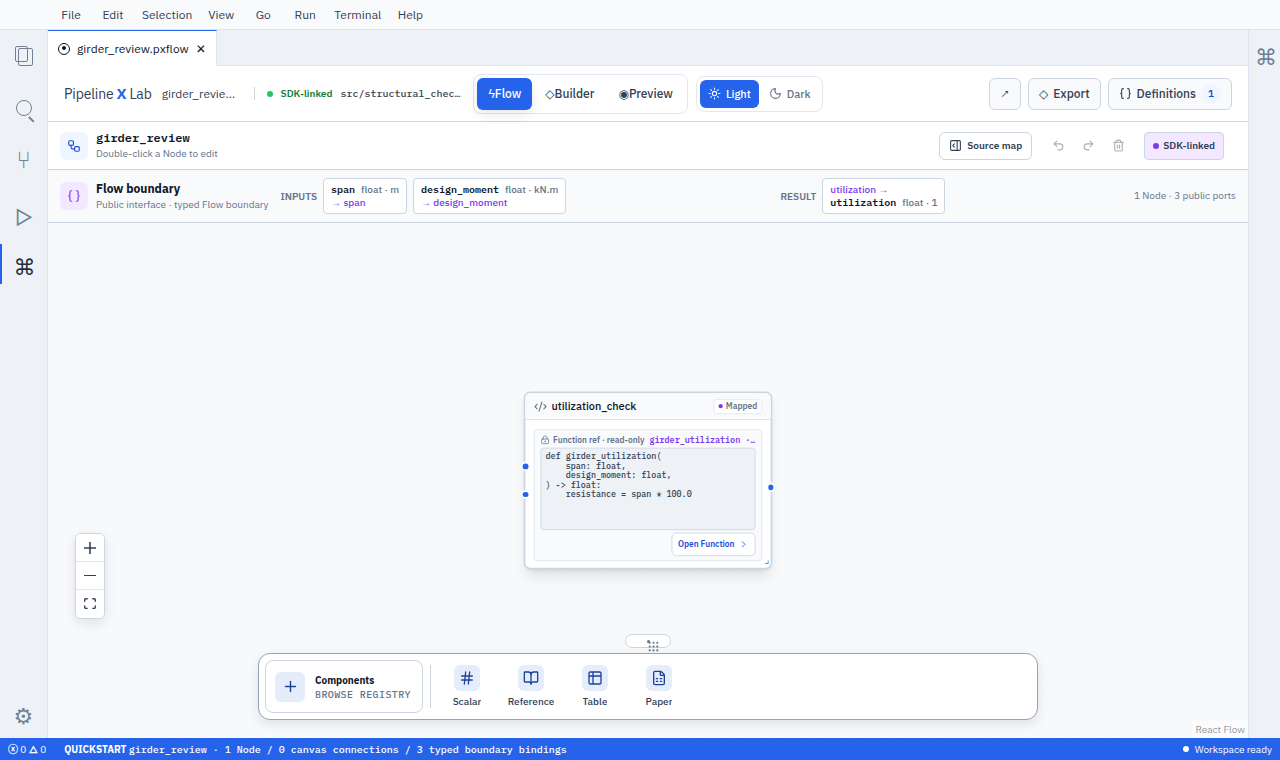
The Flow boundary lists the two inputs and one result separately from the single executable Canvas Node, keeping the SDK declaration and Flow aligned one-to-one.
For a supported Function package, make it available in a development workspace and then publish a reviewed release:
pxlab package install . --workspace <workspace_key> --development
pxlab package build . --output dist/release
pxlab package publish dist/release --channel stablePublish shows Function version changes, port compatibility, capabilities, supported runtimes, and verification results before the user confirms the upload. The Component decorator-to-container compiler portion of this workflow remains contract_only. Internal V1 reader/fixture probes consume a separately prepared manifest, one declaration, and an executor container, but that path is not production third-party install admission. Production Component install and activation remain blocked by the authorization and trust closure above.
Define the shared contract once
Each consumer reads the same key, type, shape, unit, description, policy, and capability metadata. Do not recreate those definitions in UI, MCP, or package-specific formats.
The current public syntax keeps the ordinary Python type in parameter annotations and px.Results annotated fields. Port and settings markers are current; the Record field marker and the typed Table remain planned:
| Purpose | Status | Syntax |
|---|---|---|
| Input | current | span: float |
| Named result | current | utilization: float in a px.Results subclass |
| Collection | current | list[T] |
| Port metadata | current | px.input(...), px.result(...) in the default-value position |
| Component settings | current | px.setting(...) on a px.Settings subclass |
| Record schema | current | annotated fields on a px.Record subclass |
| Record field metadata | contract_only · planned | px.field(...) |
| Typed Table | contract_only · planned | px.Table[LoadCase] |
Write the type once. PipelineXLab-specific types are reserved for shapes that standard Python does not provide, such as tables, artifacts, and evidence.
Write a minimal Function
from pipelinexlab import px

class GirderResults(px.Results):
    utilization: float


@px.function(
    key="girder_resistance",
    version="1.0.0",
    description="Calculates girder utilization for the supplied span.",
)
def girder_resistance(span: float) -> GirderResults:
return GirderResults(utilization=calculate_utilization(span))Every public Function has an explicit semantic version and a useful description.
Know where each field comes from
| Information | Single source |
|---|---|
| Function key | Explicit stable @px.function(key=...) value |
| Function version and description | @px.function(...) |
| Input key and type | Plain Function parameter and its Python annotation |
| Result key and type | Named px.Results annotated field |
| Unit and description | px.input(...) or px.result(...) in the default-value position |
| Constraint and connection | No current target marker |
| Required | Absence of a plain Python parameter default |
| Default | Plain Python parameter default |
| Nullable | Whether the type includes None |
Authors use ordinary Python types and do not repeat the type inside a marker. Do not repeat required/default/nullability in a second metadata list, and do not parse docstrings to reconstruct the public contract.
Use closed types, explicit shapes, and units
- Distinguish scalar, record, list, table, and object-reference shapes.
- Use named result fields instead of tuples, positions, or
output0. - Use closed records and tables with stable
lower_snake_casefield keys. - Give each engineering number a canonical unit; use
"1"for dimensionless values. - Declare a domain row key when rows must retain identity.
- Keep large tables and binary results behind bounded object references with previews.
For multiple results, every named field is an independent result port. AI and future Component presentation select the exact field; declaration order is never a default.
Control external discovery
Input and result ports default to connection=True. Set connection=False only for internal values that should stay outside a planned host-owned Component surface, AI, or cross-Flow discovery.
This setting does not control Project ACLs, package installation, result-resource access, filesystem permission, network access, or secret access. Explicit connections within the same Flow remain available.
Declare execution behavior and capability
This example is contract_only and is not executable with the current SDK: px.policy(...) and px.capabilities(...) are planned symbols the facade does not export. px.input(...) in the default-value position is current.
@px.function(
    key="external_section_check",
    version="1.0.0",
    description="Checks a section with an external design service.",
    policy=px.policy(
        deterministic=False,
        parallel_safe=False,
        side_effect="external",
        cache="none",
        retry="never",
        timeout_seconds=60,
    ),
    capabilities=px.capabilities(
        files="none",
        network=("api.example.com",),
        secrets=("structural_api",),
        gpu=False,
    ),
)
def external_section_check(
    section: Section = px.input(description="Section to check."),
) -> SectionCheckResults:
...Declare the narrowest capability ceiling. Runtime combines it with Project policy, user approval, dependency order, and quota. parallel_safe=True permits parallelism but does not force it. Live is an execution trigger, not a worker-count setting.
Build a Flow from Functions
A Flow is a module-level declarative object, not a decorated function. One .py Flow module exports one flow object by convention.
flow = px.Flow(
    "bridge_review",
    label="Bridge review",
    description="Combines loads and checks resistance.",
)
span = flow.input("span", float, unit="m", description="Clear span.")
load_cases = flow.input(
    "load_cases",
    list[float],
    description="Load cases.",
)

combinations = flow.node("load_combinations", combine_loads)
resistance = flow.node("resistance_check", girder_resistance)

flow.connect(load_cases, combinations.inputs.load_cases)
flow.connect(span, resistance.inputs.span)
flow.connect(
    combinations.results.design_cases,
    resistance.inputs.design_cases,
)
flow.result(
    "governing_utilization",
    resistance.results.governing_utilization,
)- Only
flow.node(node_key, target, *, settings={...})creates a durable Node placement; Function targets render on the Canvas and current Component targets appear asunsupported. - Every executable Python Node target uses
@px.functionwith an explicit stable key. Undecorated functions are implementation helpers. - An
@px.functiontarget becomes a Function Reference Node managed in Definitions; changing it opens an impact review for every placement. - An existing V1 artifact can store an exact seven-field
ComponentRef; the production reader presents it asunsupported. New production third-party placement is blocked. Successor V2 rendering is host-ownedcomponent.declarative@2only. - Every value relationship uses
flow.connect(source, node.inputs.port). - Every public result uses
flow.result("result_key", source). flow.group(...)changes same-Flow presentation membership only.- An imported exported Flow object uses
flow.subflow(...)and opens read-only in the caller.
Function and Component decorators register definitions and metadata only. They never place or run a Node and never own nodeKey, layout, wiring, or a Run trigger. Complex Flows remain top-level declarative compositions rather than large decorated functions.
Publish the boundary used by a Report
flow.input(...) and flow.result(...) define the saved Flow's public boundary. px.Report and Report Workbench use those public ports when an author connects a .pxreport document to the Flow.
The Report owns both mappings in .pxreport. In Python, connection = report.connect_flow(...) returns a Connected Flow handle. Its .bind() method connects a Report value to a Flow input, and .show() connects a Flow result to a Report position. flow.connect(...) continues to describe only a connection inside the Flow, so adding or moving a Report mapping leaves this Flow module unchanged. See Author a Flow and Report with Python.
Design for Table inputs and batch Runs
A px.Table[RecordType] input receives one typed Table value in one Flow Run. If a caller needs several scalar input sets, it submits explicit Runs against the same saved Flow revision. A document table does not create hidden row Runs or Canvas Nodes.
An N×1 value is not compatible with a scalar port. Use a declared list or Table port for one Run, or create an explicit Batch Run with complete scalar input sets. Do not infer execution count from the selected shape or visual position.
Version the public meaning
| Change | Typical Function SemVer |
|---|---|
| Description correction with unchanged meaning | patch |
| Optional input or compatible named result addition | minor, after compatibility tests |
| Required input addition | major |
| Port key removal or rename | major |
| Type, shape, unit, or nullability change | major |
| Calculation standard or formula change | minor or major according to semantic impact |
| Performance improvement within the same numerical contract | patch after regression tests |
Package version, Function version, SDK contract version, and Runtime compatibility range remain separate. A package rebuild does not silently change Function meaning.
Test the whole user path
Before publishing, verify:
- Function unit, boundary, failure, cancellation, and numerical-tolerance cases.
- Descriptor keys, types, units, descriptions, defaults, policy, and capabilities.
- SDK declaration → direct object → deterministic
.pxflow→ load round-trip. - Native, WASM, and Python validation parity.
- PXFLOW canvas and SDK-linked source-safe editing parity.
- Scalar/list/Table shape validation and explicit batch Run; V2 Component bindings stay within the host-owned declarative projection and accept settings declared through
component-declared-settings@1. - MCP search, describe, plan, run, result, error, and permission behavior.
- Worker isolation, resource limits, network/file/secret policy, timeout, and cancellation.
- Large-result bounds, partial row failure, recovery, and representative performance budgets.
- Signed package provenance, license notices, and rollback information.
A release is available in the catalog only when every supported consumer uses the same Flow, Node, port, Function version, Flow revision, diagnostic, and Run provenance.