

SDK and PXFLOW Studio
PXFLOW Studio opens a Flow from one of two authoring owners. An SDK-linked Flow is owned by its Python source and dependency lock; Studio opens the validated Flow revision materialized from that source. A PXFLOW-native Flow is owned by its .pxflow revision and can be authored directly on the Canvas. Report Workbench uses either Flow through public inputs and results while keeping Report mapping in .pxreport. The PXFLOW action in Project Home opens Studio.
Current Python facade and Component boundary
The current public facade provides px.component, px.Results, px.Flow, and px.Client. It does not provide px.input, px.result, px.setting, or px.client(). Current Function and Component ports come from ordinary Python parameter annotations and annotated px.Results fields.
@px.component currently registers process-local companion metadata; it does not compile a portable declaration or executor, resolve an installed release, or create a durable ComponentRef. Existing V1 presentation and settings wire remains compatible, and an already-saved exact target is preserved as read-only unsupported. Production exposes no new third-party Component placement. The current internal/test flow.node(...) resolver primitive can use a live px.Client to persist an exact ComponentRef, but that primitive is not production third-party admission. Caller and release policy keep it unexposed until both P0 closures are complete. The successor V2 Canvas mounts only the host-owned component.declarative@2; settings are declared through component-declared-settings@1, at most eight per declaration, and the host draws each control from its own registry. Rich surfaces belong to component-rich-surface-declaration@1, the RFC-016 successor, whose bridge grants reading the Node context and proposing a settings patch and nothing more. Exact ProjectScope data-path isolation is implemented, but third-party Component activation remains blocked until authenticated-principal authorization, execution-trust closure, and the explicit production gates are implemented.
Use two-level SDK names
Every SDK example begins with from pipelinexlab import px. Current PipelineXLab root types and decorators keep the px. prefix: px.Flow, px.Report, px.Client, px.Results, @px.function, and @px.component. Once a root object exists, its methods state which document or operation they change:
from pipelinexlab import px


flow = px.Flow(
    "girder_review",
    label="Girder review",
    description="Checks girder demand against resistance.",
)
span = flow.input("span", float, unit="m", description="Clear span.")

report = px.Report("girder_report", title="Girder report")
basis = report.section("basis", title="Design basis")
report_span = basis.value("span", 12.0, unit="m")
connection = report.connect_flow("strength_check", flow)
connection.bind("report_span_to_span", report_span, to=flow.inputs.span)
report.save()

client = px.Client(workspace="engineering", project="bridge_project")
run = client.run(connection)Here flow, report, basis, connection, and client are variables that hold objects created on the preceding lines. The fixed SDK names use px.*; follow-up work is called on the object that owns it. Imported package targets keep their package namespace, for example midas_components.model_viewer; this makes project code visibly different from installed capabilities. Every current public Python surface, including a hosted app, creates px.Client(workspace="engineering", project="bridge_project") with both scopes explicit. A host-injected lowercase px.client() convenience remains a planned contract.
Keep definitions, placements, and values separate
| Concept | SDK | PXFLOW Studio |
|---|---|---|
| Function | @px.function | Definitions → Functions |
| Component companion | current process-local @px.component metadata | no new production placement; already-saved exact refs remain unsupported |
| Python helper | plain Python def; a Function declares it via helpers=[...] so it travels in the Function revision, a Component keeps it in its executor module | not a Canvas object |
| Node | flow.node("node_key", target) | placed Canvas instance |
| Flow | flow = px.Flow("flow_key", ...) | Canvas, interface, saved revision |
| Structured value · planned | @px.record contract | Record schema in port details after marker delivery |
@px.function registers an executable definition. Current @px.component registers only process-local companion metadata and annotation-derived ports. Successor V2 presentation is the host-owned component.declarative@2 projection only. Function Nodes come from explicit flow.node(...) placement. New third-party Component placement is blocked in production; the current internal/test resolver primitive can resolve and persist an exact ref, but its existence does not authorize production use. Only after both P0 closures may the product expose that spelling for an admitted exact release in the same Project. Plain Python helper functions -- declared on the Function via helpers=[...] so their source is committed into its revision -- are not placement targets.
One .py Flow module exports exactly one public module-level flow object. Use a separate module for each additional Flow. Complex Flows continue with top-level declarative placement and wiring statements.
Code-to-canvas example
from pipelinexlab import px


class GirderResults(px.Results):
    utilization: float


def calculate_utilization(
    span: float,
    permanent_load: float,
    variable_load: float,
) -> float:
    governing_load = permanent_load + variable_load
    return governing_load / (span * 100.0)


@px.function(
    key="girder_resistance",
    version="1.0.0",
    description="Calculates girder utilization from two design loads.",
)
def girder_resistance(
    span: float,
    permanent_load: float,
    variable_load: float,
) -> GirderResults:
    return GirderResults(
        utilization=calculate_utilization(span, permanent_load, variable_load)
    )


flow = px.Flow(
    "girder_review",
    label="Girder review",
    description="Checks girder utilization for design load cases.",
)
span = flow.input("span", float, unit="m", description="Clear span.")
permanent_load = flow.input(
    "permanent_load", float, unit="kN", description="Permanent design load."
)
variable_load = flow.input(
    "variable_load", float, unit="kN", description="Variable design load."
)
resistance_check = flow.node("resistance_check", girder_resistance)
flow.connect(span, resistance_check.inputs.span)
flow.connect(permanent_load, resistance_check.inputs.permanent_load)
flow.connect(variable_load, resistance_check.inputs.variable_load)
flow.result("utilization", resistance_check.results.utilization)| SDK declaration | PXFLOW Studio |
|---|---|
@px.function | shared Function in Definitions |
flow = px.Flow(...) | one Flow and saved revision stream |
flow.node("resistance_check", ...) | Function Reference Node |
flow.connect(...) | typed input connections |
flow.result(...) | public typed Flow Result |
px.Results fields | named result ports |
@px.record · planned | structured value schema after marker delivery |
Each flow.connect(source, destination) call remains one addressed typed connection. When one structured public input feeds several Nodes, the Canvas may collapse the parallel lines into a boundary summary with its exact binding count. This reduces visual noise without merging the connections; Python still shows and locates every flow.connect(...) declaration.
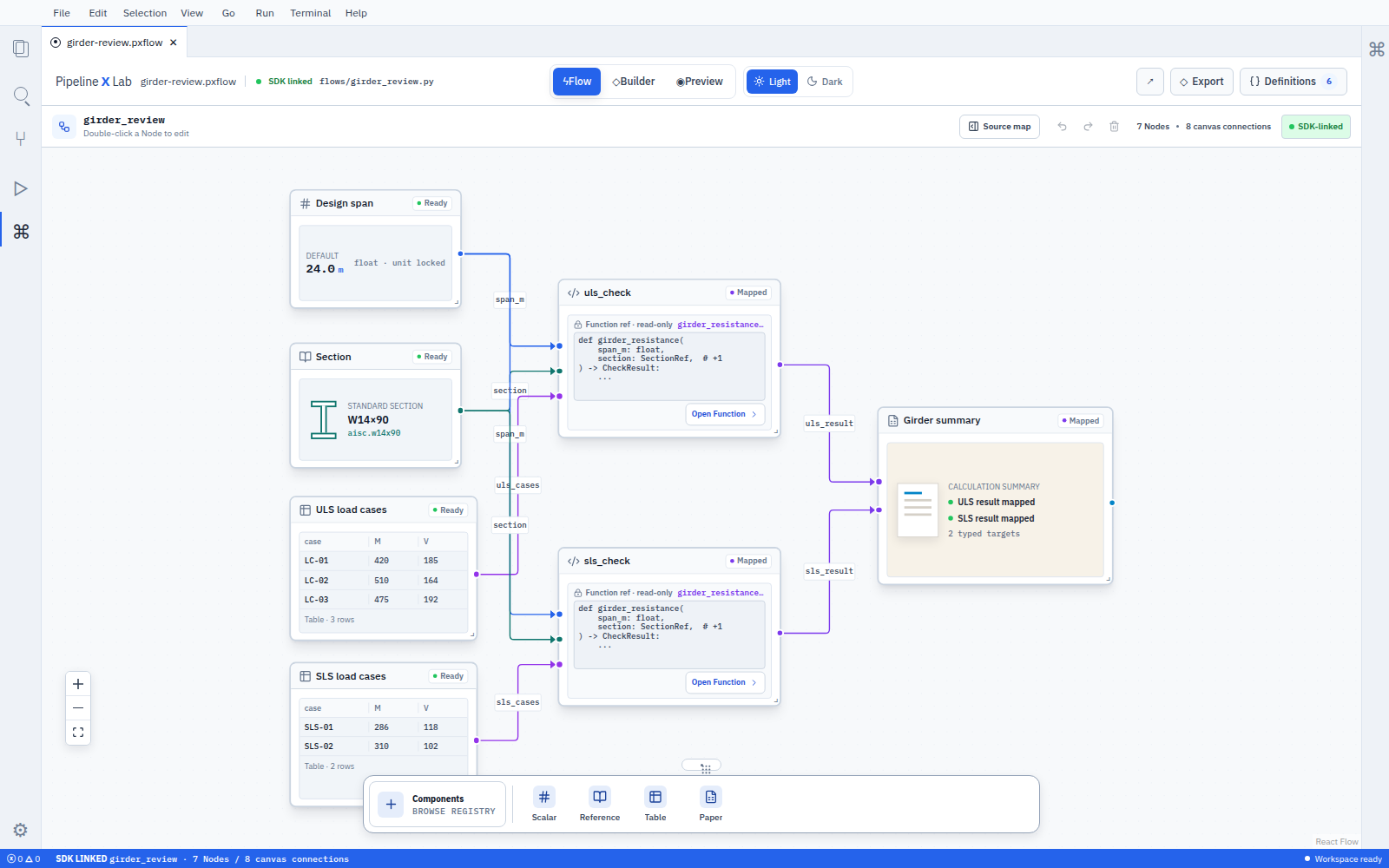
Use the Flow from a Report
The SDK and PXFLOW Studio author the calculation structure. px.Report or Report Workbench defines where a Report value enters the public Flow boundary and where a public Result appears in the Report. In Python, create report = px.Report(...), then receive connection = report.connect_flow(...); .bind() and .show() belong to that Connected Flow handle.
| Relationship | Define or edit it here | Owner |
|---|---|---|
| Public Flow input | SDK flow.input(...) or the Studio Flow interface | SDK-linked Python source or PXFLOW-native .pxflow |
| Internal port connection | SDK flow.connect(...) or a Studio Canvas connection | SDK-linked Python source or PXFLOW-native .pxflow |
| Public Flow result | SDK flow.result(...) or the Studio Flow interface | SDK-linked Python source or PXFLOW-native .pxflow |
| Report-authored value → public Flow input | Connected Flow handle .bind() or Report Workbench Use report input | .pxreport |
| Public Flow result → Report position | Connected Flow handle .show() or Report Workbench Show result | .pxreport |
Adding a connection from Report Workbench selects the saved public-port contract and updates the Report mapping. The SDK-linked Python source and the internal Canvas connections keep the same structure. Several Reports can therefore reuse one Flow with different authored values and result positions.
The connection Overview in Report Workbench traces the selected route from a public input through the internal Nodes to a public result as a read-only view. Choose Open in PXFLOW Studio when the Flow itself needs editing.
- Create both connection directions in Report Workbench
- Map scalar, Record, and Table values
- Review the exact Report–Flow storage contract
The two Node target kinds
An explicit flow.node(...) placement accepts:
- an
@px.functiontarget for a Function Reference Node; or - after both P0 closures, an imported
@px.componentcompanion matched to an admitted exact release in the same Project.
Current production does not expose the second form for new third-party placement. It preserves any already-saved exact ComponentRef as unsupported. Successor V2 uses only the host-owned declarative Node projection.
Each decorator requires an explicit stable lower_snake_case key. Renaming the Python implementation symbol does not rename the registered target or its placed Nodes.
flow.group(...) stores editable visual membership between existing same-Flow Node handles. flow.subflow("subflow_key", imported_flow) places an imported separate Flow as a read-only External reference; Edit source Flow opens its owner.
from structural_sections.flows import section_properties as section_properties_module


geometry = flow.input(
    "geometry",
    SectionGeometry,
    description="Section geometry.",
)
section_properties = flow.subflow(
    "section_properties",
    section_properties_module.flow,
)
flow.connect(geometry, section_properties.inputs.geometry)
flow.result("area", section_properties.results.area)The caller connects the External reference interface while the imported Flow retains ownership of its internal Nodes and source.
Choose a value shape
| Value sent through one port | Annotation |
|---|---|
| scalar | float, str, bool |
| one structured value · planned | an @px.record type |
| one list value | list[T] |
| one typed table value · planned | px.Table[RecordType] |
A Table binding is one value and one Flow Run input. For several scalar input sets, open Run → New batch, review the complete input sets, and start explicit Runs against the same saved Flow revision.
Choose the authoring owner
SDK-linked
Python source and its dependency lock are the owner.
- Studio shows a reviewed source diff for supported edits.
- Apply stages the candidate diff, validates and materializes it, then commits the source and Flow revisions together after semantic parity passes.
- Unsupported source-safe edits offer code editing or an explicit PXFLOW-native copy.
- A failed validation or parity check keeps the previous source and Flow revisions.
While Flow is selected, use the separate Visual / Python switch in the top toolbar. Visual edits the Canvas; Python edits the same Flow module, including px.Flow, public boundaries, Node placements, connections, Groups, and Subflows. Switching views does not save. Update Flow stages and validates the candidate, materializes a candidate Flow, checks semantic parity, and then commits the source revision and Flow revision together before replacing the Canvas. A failed update keeps the Python draft, last valid source, and last valid Visual Flow. While a dirty or invalid Python draft exists, Visual identifies the last applied Flow and locks structural editing until the user chooses Update Flow or Discard. Selecting a Node in the Flow outline locates its Canvas Node in Visual or its flow.node(...) declaration in Python.
Shared @px.function bodies remain in Project Definitions, and installed Component implementation remains with its owning package.
PXFLOW-native
The .pxflow direct object is the owner.
- Place shared Functions or imported Flows. Component discovery and placement in the dock are planned.
- Edit Node keys, Groups, and typed bindings. V2 settings are declared through
component-declared-settings@1, at most eight per declaration. - Save creates a new Flow revision.
Studio-to-SDK write-back for an SDK-linked Flow is a source-safe code action against the existing Python module, followed by forward rematerialization and semantic comparison with the reviewed candidate Flow. A PXFLOW-native Flow can show derived SDK code as a structural preview, while its .pxflow direct object remains the authoring owner. Python bodies, helpers, import layout, comments, and formatting stay in Python source, and multiple Python programs can materialize the same Flow. Studio therefore preserves an existing source and applies reviewed source-safe edits to it.
Use semantic keys
- Use stable
lower_snake_caseFlow, Function, Node, Group, and port keys. - Keep each Node and Group key unique within its Flow.
- Treat a key rename as an impact-reviewed change.
- Use semantic keys for connection addresses; labels, UUIDs, local paths, source positions, variable names, and canvas coordinates remain presentation or implementation details.
Declare ports once
For a current Function or Component companion, the parameter name and annotation own an input key and type. An annotated px.Results field owns a result key and type. px.input(...) and px.result(...) are current markers that add description and unit in the default-value position; connection=False metadata stays a contract_only plan. px.setting(...) declares one px.Settings field, and component-declared-settings@1 owns that schema. Project ACLs and execution policy remain separate from port discovery.
Component packages use the same Flow contract
A Python distribution may export several @px.component companion targets. The current portable V1 container carries one declaration and executor entry; there is no automatic decorator to package compiler. The current CLI install path is internal/test-only for third-party containers: its contribution data path has exact Project isolation, but it has neither authenticated-principal authorization nor an inactive quarantine state, so it is not a supported production admission procedure. The saved exact ComponentRef remains readable but unsupported in the production Flow reader. Import and placement become supported only after the authorization and execution-trust closure described above and the explicit production gates are implemented.
Multi-declaration package compilation and Components-dock discovery belong to the versioned portable-container V2. Its Canvas surface is host-owned component.declarative@2, with settings declared through component-declared-settings@1. Package renderer/modal/editor contributions are not V2 fields; rich surfaces belong to component-rich-surface-declaration@1, the RFC-016 successor.
Run and Result
SDK client.run(...) after client = px.Client(workspace="engineering", project="bridge_project"), PXFLOW Run, and MCP pxflow_run execute the same supported saved Flow revision and produce typed Results. Current Component targets stop at the production reader's unsupported state. Exact ProjectScope data-path isolation is implemented, but Component execution is not a supported third-party capability: Validate and Run remain blocked until Project authorization and execution-trust closure are implemented. Rich artifact presentation is outside V2 and belongs to component-rich-surface-declaration@1, the RFC-016 successor.
Continue
- Start in Report Workbench
- Author a Flow and Report with Python
- Connect Report inputs and Flow results
- Use Components and Component packages
- Build and use Components
- Understand Runs and recovery
Create a personal service Project
Connect a px.Client to the service with workspace="personal", the new Project key, service_url, access_token, and the selected organization, then call:
project_ref = client.create_project(
    name="Section analysis",
    command_id="create_section_analysis",
)
# Use the same Client for the existing save(), run(), and open_report() APIs.create_project(*, name: str, command_id: str) -> str returns an opaque catalog reference; it does not replace the SDK Project key. Keep the same request ID, scope and name when retrying after losing a response. A replay returns the original Project without duplicating grants or audit records. Changing the request body under that ID or adopting an existing Project key is refused. The current personal account, memberships, V1 eligibility and explicit creation authority must still permit the request. Login and replay never restore revoked creation authority.
The token must permit product.runtime.handshake, project_search, and product.project.create. Existing save/run operations need their own token scopes as well as Project capabilities. For example, Flow saving calls pxflow_validate, pxflow_describe, pxflow_plan_change, and pxflow_apply_change. Catch px.Error and inspect its diagnostics. The Client reference lists the conflict and permission diagnostics and the UTF-8 input limits.
This operation creates a personal service Project. Local-only SDK authoring and execution retain their existing behavior and do not require it. A compatible SDK/server operation descriptor is required; check operation availability and account provisioning on the service you use.