

Build and use Components
Keep definition and placement separate.
A Component is a catalog definition supplied by an installed Component package. Do not call it a Node until flow.node(...) places it in a specific Flow. One Python Component package/distribution may export one or more Component definitions. The separate portable Component container V1 reader accepts exactly one closed content/component.json declaration per container. That declaration carries its own componentContractVersion, typed ports, executor entry, and container-carried, integrity-measured declarative presentation (icon and summaryResultKeys). Neither definition nor container metadata places or runs a Canvas object or owns nodeKey, layout, wiring, or a Run trigger.
FUTURE V2: Component Node presentation and third-party UI and node-presentation-profile.v2.json describe a contract_only requiredContractVersion: 2 successor that carries multiple Component declarations in one portable container. Its Node projection starts a separate host-renderer version axis at component.declarative@2, not a reuse of component.signed@1. Its value schema is component-declarative-node-value.v1.schema.json with schemaVersion: 1; that renderer version is independent of Component container contract V2, descriptor schema V2, and componentContractVersion. The host renderer and presentation-resolution bridge are implemented for the bounded local-admin lane; this is still not the current V1 component.signed@1 contract and does not open public third-party admission.
Keep two states apart
- The implemented lane. Deterministic packing, drop-folder install, exact ProjectScope data-path isolation, the Project-scoped catalog query, the publisher/packageKey-qualified multi-Component resolver, the presentation resolution port and Python worker execution are implemented and are named path by path as RFC-014's
partial-foundationimplementation evidence. - Public third-party admission stays contract_only and fail closed. RFC-014 keeps
productAvailability: contract_onlyand every activation flag false. No authenticated-principal authorization, no execution-trust closure and no inactive quarantine install state exist, so public marketplace publisher admission and package executable UI stay refused, and the commands and screens below are not a public admission path. Exact ProjectScope data-path isolation alone opens nothing: third-party Component activation and install admission remain blocked until authenticated-principal authorization and execution-trust closure are implemented, and an inactive quarantine install state would not replace either.
Use an installed Component
The following dependency spelling belongs to the planned product contract; it is not a current executable CLI command.
# Planned contract only; not a current executable command.
pxlab dependency add midas_civil@^2.3.0Review the release, license, capability request, and supported platform before installation. Call a release signed or verified only when a verified marketplace channel records signature verification. The Studio workflow that presents reusable definitions as Component cards under Components → Installed opens only after public admission; it is not a released capability.
The implemented local-admin install entry is python -m pipelinexlab install <source> --workspace <key> --project <key>. It accepts a Project scope, and the contribution key and repository reads carry the exact Workspace/Project pair. It is still not a public admission path: authenticated-principal authorization, execution-trust closure and the public install/activation gates remain absent.
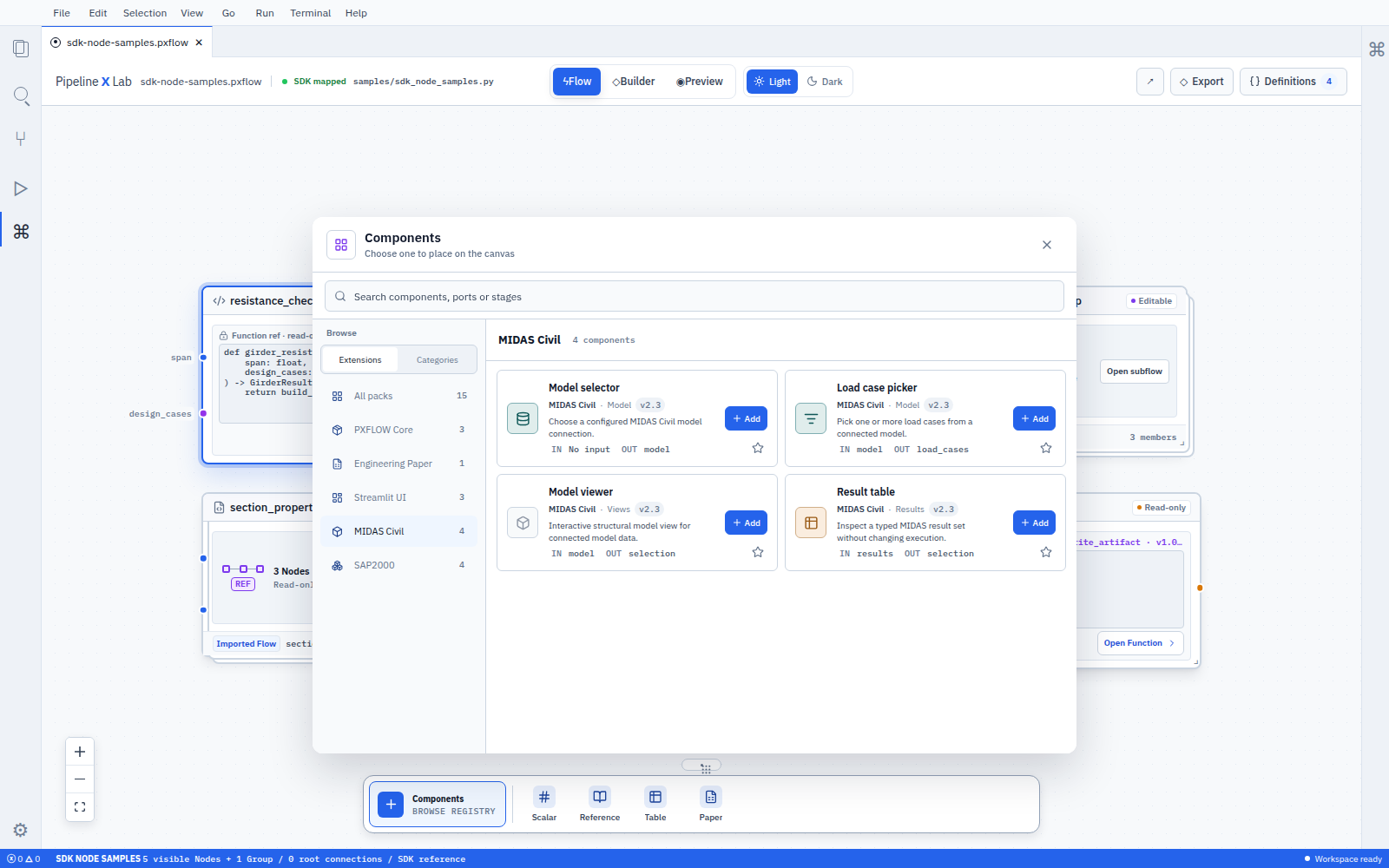
A Python Component distribution may export several definitions. A portable V1 container carries one declaration and a generation-2 container carries several; only a card placed in a Flow becomes a Node.
Import the Component definition from the package's public .components module.
from pipelinexlab import px
from midas_civil import components as midas_components


flow = px.Flow(
    "bridge_model_review",
    label="Bridge model review",
    description="Reviews selected members in one MIDAS model.",
)
model = flow.input(
    "model",
    ModelRef,
    description="MIDAS Civil model to review.",
)

view = flow.node(
    "model_view",
    midas_components.model_viewer,
    settings={"display_mode": "solid"},
)
flow.connect(model, view.inputs.model)
flow.result("selection", view.results.selection)| Code | Meaning |
|---|---|
midas_components.model_viewer | Reusable Component definition registered under its process-wide componentKey |
"model_view" | Stable nodeKey owned by this Flow placement |
settings={"display_mode": "solid"} | Current instance settings for this placement |
flow.connect(model, view.inputs.model) | Explicit input connection |
view.results.selection | Named result source on the placed Node |
Do not pass input bindings as arbitrary placement keyword arguments. Every value relationship uses flow.connect(source, node.inputs.port). The installer stores the measured release and closed-grammar-validated declaration; the post-install product resolver later joins them into the exact seven-field ComponentRef. The current resolver looks up only componentKey, so two measured releases with the same key are refused as ambiguous rather than selected by a package namespace.
Define a Component with @px.component
One Component package can register several Component definitions.
from pipelinexlab import px


class ModelViewerResults(px.Results):
    selection: ModelSelection


@px.component(
    key="model_viewer",
    label="Model viewer",
    description="Displays a connected MIDAS Civil model.",
    category="review",
    subcategory="model",
)
def model_viewer(
    model: ModelRef,
) -> ModelViewerResults:
...| Declaration | Definition data |
|---|---|
Python name model_viewer | Stable, process-wide componentKey |
| package key and version | Distribution identity |
| Plain typed parameter | Input-port schema |
Annotated px.Results field | Result-port schema |
px.setting(...) on a px.Settings subclass passed as settings= | Declared instance settings, at most eight per declaration |
flow.node(..., settings={...}) | This placement's own values for the declared settings |
category | The primary task, one of input, transform, calculate, review, deliver, control |
subcategory | The publisher's own optional key under that category |
| portable V1 container | Independent componentContractVersion and container-carried, integrity-measured declarative icon/summaryResultKeys |
The public SDK exports px.input, px.result, px.setting, px.Settings, and px.Record. It derives input and result ports from plain Python annotations, and px.input(...)/px.result(...) state description, unit, and connection beside the annotation in the default-value position. Instance settings are declared with px.setting(...) on a px.Settings subclass attached through @px.component(settings=...); component-declared-settings@1 validates them, admitting at most eight per declaration with unique setting keys and refusing a duplicate key or an over-count declaration by name. The host draws each control from its own registry. A placement's settings={...} values are passed to the packaged executor's execute(inputs, settings) entry.
The decorator registers the descriptor. px.build_package(folder) then projects every registered descriptor into content/components/<componentKey>.json in the exact canonical bytes the installer requires, and refuses a target by name when it states less than a declaration needs. Neither step turns the decorated callable body into the portable executor; authors must separately provide the container's executorEntry source.
Do not mix members from these three authorities.
| Authority | Current V1 ownership |
|---|---|
Portable content/component.json declaration | The single classification: "flow-node", typed ports, executor, and container-carried, integrity-measured declarative presentation; no category or instance settings |
Authoring ComponentDescriptor | The closed primary task category, the publisher's own open subcategory, and typed Component discovery; it does not redefine portable classification |
.pxflow componentNode placement | Node-local settings and bindings; setting values do not become declaration or category members |
The Python registry keys descriptors by process-wide (kind, key), not by package namespace. Component keys therefore must be unique across imported distributions in one process. The current product resolver also accepts only componentKey; package-scoped collision-free lookup is not implemented.
The following [tool.pipelinexlab] block illustrates a planned Python-distribution-to-container build contract. The current packager does not consume it.
[project]
name = "pipelinexlab-midas-civil"
version = "2.3.4"

[tool.pipelinexlab]
contract-version = 1
package-key = "midas_civil"
entry-module = "midas_civil.components"
public-module = "midas_civil.components"px.build_package(...) bridges the Python @px.component descriptor to the generated portable declaration; there is no bridge from the callable body to a generated executor. Separately authored V1 container bytes are accepted by the reader only when they carry exactly one closed content/component.json declaration. Its componentContractVersion evolves independently from the Python distribution version, and the declaration keeps the exact componentKey, typed ports, executorEntry, and integrity-measured declarative icon and summaryResultKeys together. Current category metadata and settings={...} placement semantics remain unchanged.
The installer records the measured release and closed-grammar-validated declaration. After install, product.component.resolve joins those records and judges the result through the closed target grammar to produce the exact seven-field ComponentRef. Execution materialization is separate: the worker revalidates the pinned release identity and executor source digest.
Without a trust authority, the current installer refuses a signed Component before recording it. An explicitly accepted unsigned Component is recorded only as absent / not-checked. Only a verified marketplace channel may call a release or declaration verified or signed after it performs and records signature verification. component.signed@1 is a registry identifier, not evidence of that verification.
The reader does not connect icon or summaryResultKeys to component.signed@1. In the implemented lane an admitted Component target is projected into the host-owned component.declarative@2 body, and only a target that cannot be resolved falls back to the read-only unsupported diagnostic that preserves its exact identity. The presence of a design-system registry entry is still not, by itself, a released public capability.
Create a Project-owned Function Node
Use @px.function for every executable Python target. Undecorated functions remain helpers inside the Function or Component implementation.
@px.function(
    key="custom_section_check",
    version="1.0.0",
    description="Checks one project-owned section.",
)
def custom_section_check(
    section: Section,
    load: Load,
) -> CheckResults:
    return calculate_check(section, load)


flow = px.Flow(
    "section_review",
    label="Section review",
    description="Runs the project-owned section check.",
)
section = flow.input("section", Section, description="Section to check.")
load = flow.input("load", Load, description="Load applied to the section.")

check = flow.node("section_check", custom_section_check)
flow.connect(section, check.inputs.section)
flow.connect(load, check.inputs.load)
flow.result(
    "utilization",
    check.results.utilization,
    description="Section utilization.",
)This placement references a Project-owned Function. Edit its source in Definitions, review every affected placement together, and clone or branch the Function when one Node needs different behavior. Use @px.component for the authoring definition and open discovery metadata. Keep the portable declaration presentation and .pxflow componentNode.settings in their separate authorities.
Recover a Flow whose Component package is unavailable
The Flow document preserves the saved Node's exact Component target and settings, plus partial ports derivable from input bindings and public-result usage. Package-release contribution custody stores the canonical declaration and executor digest, but public recovery UI activation does not yet read and display that retained full snapshot.
Recovery UI may use the saved exact ref. It may use original package bytes only when the package artifact owner actually retained them; it must not infer bytes from the saved Flow or invent a last-verified full contract.
| Planned evidence | Planned PXFLOW state | Planned recovery action |
|---|---|---|
Saved exact ComponentRef; original package bytes only when retained by the package artifact owner | Read-only Component dependency required Node with exact identity and usage-derived partial ports only | Add required package, Dependency details |
| Dependency range and import symbol | Required packageKey, componentKey, and Not installed | Install compatible package |
| Wrong installed version | Version mismatch | Install required version, Review update |
| Registry unavailable | Package information unavailable | Retry, Locate package |
| License or policy denial | Exact blocking reason | Review access |
| Missing project-local source | Read-only Source required Node with exact saved identity only | Locate project source |
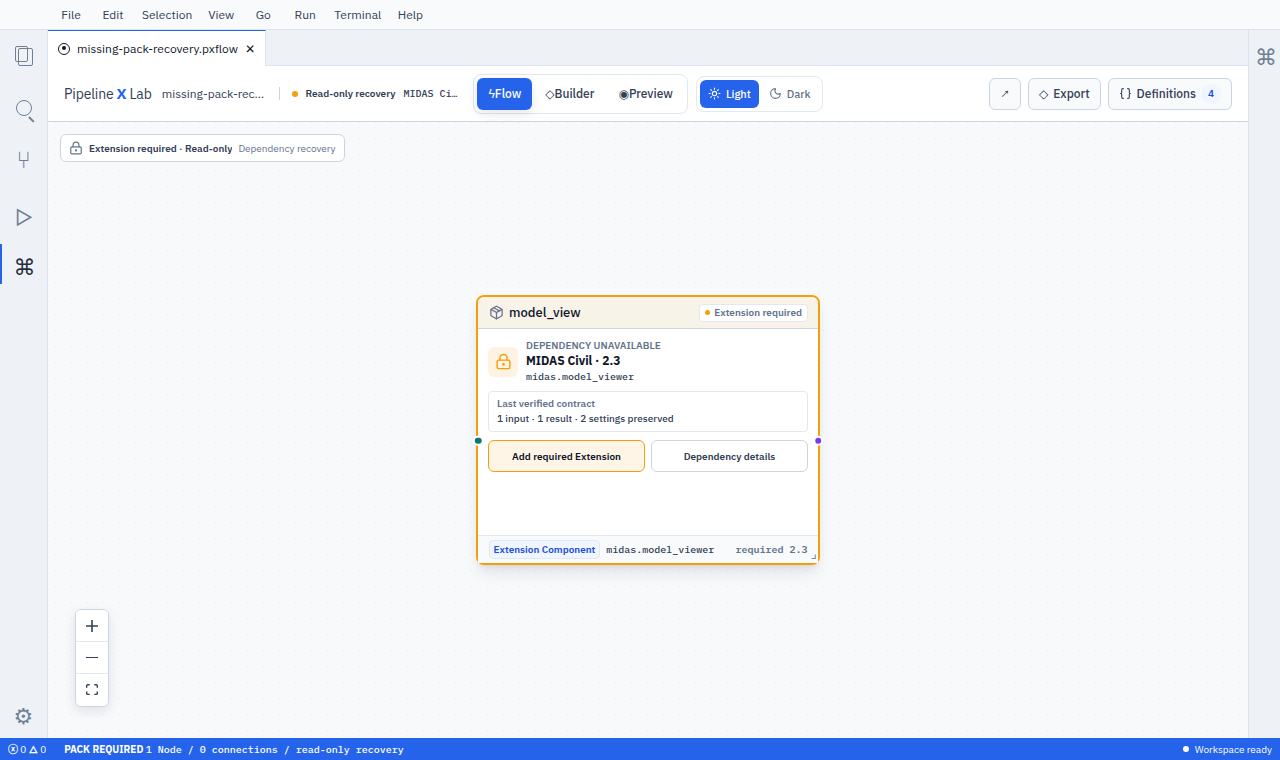
This prototype shows planned recovery actions. The Flow document itself shows the exact target, existing V1 settings, and usage-derived partial ports; reading the retained declaration from package custody into public recovery UI is still closed.
Planned recovery remains explicit:
- inspect the required package, version, and reason;
- install the required or compatible Component package;
- resolve the saved exact ref against the restored package declaration without using a cached full contract;
- Validate input, result, existing V1 setting, and connection compatibility;
- save the reviewed Flow revision.
Never substitute a similarly named Component or latest release automatically. Require an exact replacement preview and explicit Apply.
Preserve Node-local Component settings
Pass instance settings through flow.node(..., settings={...}). These values belong to the placed Node and are passed to the separately packaged Component executor; they do not create additional Canvas Nodes. A declaration that states no settings still stores an existing object unchanged on the Node instance. The successor V2 Canvas uses host-owned component.declarative@2 and accepts settings declared through component-declared-settings@1, at most eight per declaration, drawn by the host control registry. Rich surfaces belong to component-rich-surface-declaration@1, the RFC-016 successor.
from inspection_pack import components as inspection_components


review = flow.node(
    "result_review",
    inspection_components.result_review,
    settings={"template": "compact_summary"},
)
flow.connect(records, review.inputs.records)To use a Component result in a Report, first publish that value through flow.result("result_key", review.results.result_port). Report Workbench then maps the saved Flow's public result to an exact position in .pxreport. Component-internal ports remain within the Flow contract.