

Distribute and use custom Functions
Current Component boundary
The current @px.component responsibility ends at process-local companion metadata and port shapes derived from Python annotations. Existing V1 presentation and settings wire remains compatible, and the production Flow reader presents a saved exact Component target as unsupported. There is no safe inactive quarantine, so production third-party Component install admission and activation remain closed. Exact ProjectScope data-path isolation is implemented, but Project authorization and execution-trust closure are not. The successor V2 Canvas mounts only the host-owned component.declarative@2; it does not mount package UI. Settings are declared through component-declared-settings@1, at most eight per declaration, and the host draws each control from its own registry. A rich surface belongs to component-rich-surface-declaration@1, the RFC-016 successor, and this guide does not restate its entry or message shapes.
A custom Function is a reusable definition managed in Project Definitions → Functions. @px.function registers that definition and its metadata. It does not execute the function, place a Canvas object, or own a nodeKey, layout, connection, or Run trigger.
Only Studio's Place Node action or flow.node("node_key", function_target) creates a Function Reference Node.
Function, Node, and Flow
| Concept | Meaning | When it is created |
|---|---|---|
| Function | A calculation, check, conversion, or data-processing definition used by Canvas Nodes. | @px.function(key=..., version=..., description=...) registers it. |
| Node | An actual placement of a target in one Flow. | Studio places it or flow.node(...) declares it. |
| Flow | Nodes, explicit connections, public inputs, and named results. | flow = px.Flow("flow_key", ...) creates its declarative boundary. |
The V1 flow.node(...) target union records two target kinds, but only the Function path below is a currently supported production execution path:
- an explicit-key
@px.function, producing a read-only Function Reference Node managed in Definitions; or - for an existing V1 artifact or internal fixture, an explicit-key
@px.componentcompanion whose exact seven-fieldComponentRefthe production reader preserves asunsupported.
An undecorated Python def is an implementation helper called inside a Function or Component body; it is not a Canvas target. A Function can be placed more than once when each Node has its own stable nodeKey; the V1 wire preserves the same placement shape for Component artifacts, without opening a production third-party install or activation path.
For a Project-owned Function, choose Definitions → Functions → Open Function to edit its owning source. Before applying a change, Definitions shows every affected Node and the contract diff. Update the approved uses together, or choose Clone / branch and move only one Node when that placement needs different behavior.
An imported exported Flow object is not a Node target. Place it with flow.subflow("subflow_key", imported_flow) as a read-only nested Flow. Use flow.group(...) only for same-Flow presentation membership.
End-to-end lifecycle
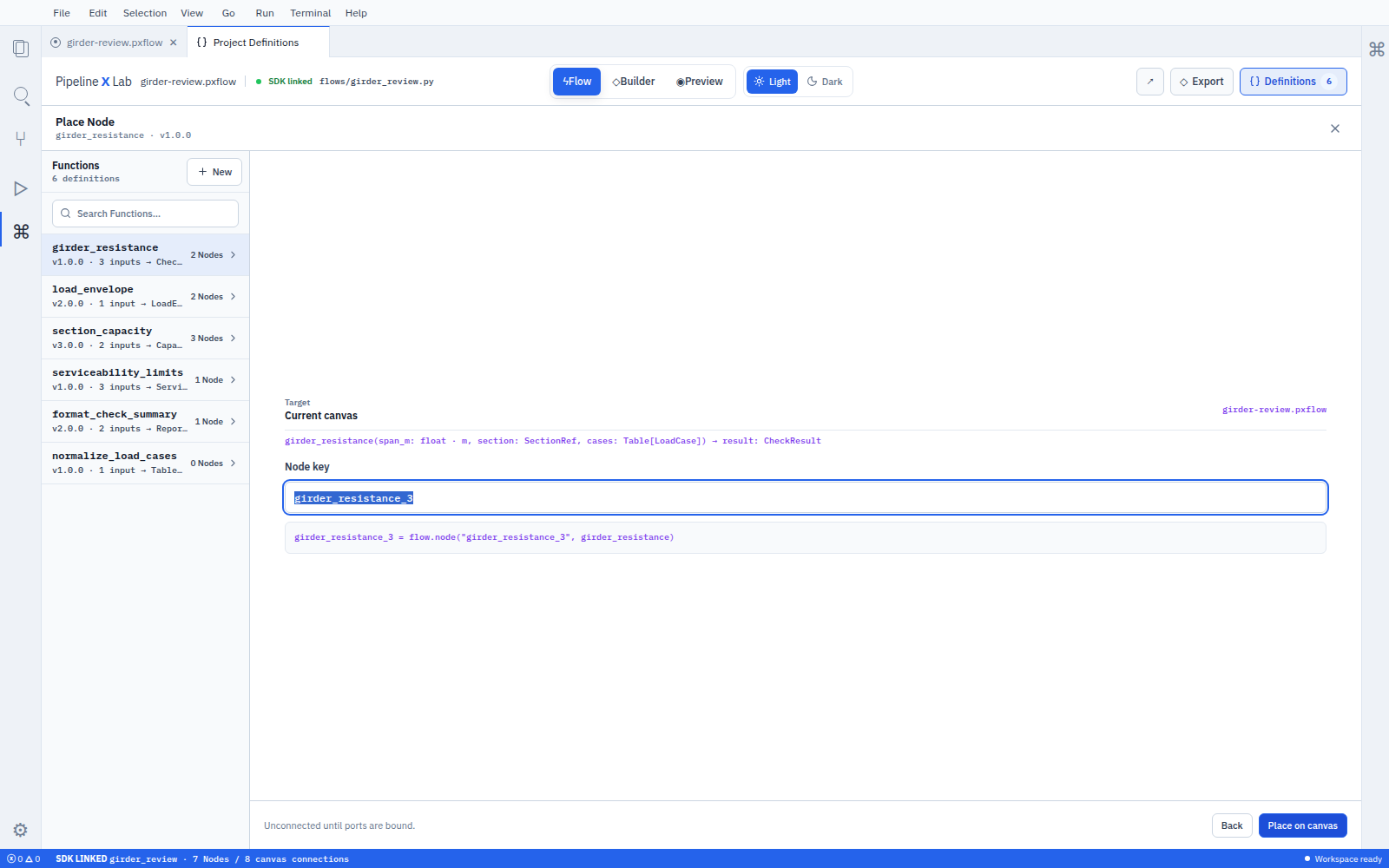
Place Node creates one Function Reference Node in the selected Flow. The reusable Function definition remains in Project Definitions.
Publish a stable Python API
[tool.pipelinexlab]
contract-version = 1
package-key = "section_tools"
entry-module = "section_tools.catalog"
public-module = "section_tools"
manual-root = "docs"The public module exports supported Functions and public types.
from .catalog import SectionResults, rectangular_section

__all__ = ["SectionResults", "rectangular_section"]The build contract keeps this public symbol, generated .pyi stub, Function descriptor, dependency lock, and signed release aligned. Internal implementation source is not part of ordinary LLM discovery.
Install and use the Function
pxlab dependency add section_tools@^1.2.0Consumers use an ordinary Python import and declare a module-level Flow.
from pipelinexlab import px
import section_tools


flow = px.Flow(
    "section_properties",
    label="Section properties",
    description="Calculates section properties.",
)
width = flow.input("width", float, unit="mm", description="Section width.")
depth = flow.input("depth", float, unit="mm", description="Section depth.")

section = flow.node("gross_section", section_tools.rectangular_section)
flow.connect(width, section.inputs.width)
flow.connect(depth, section.inputs.depth)
flow.result("area", section.results.area)| Studio action | SDK declaration |
|---|---|
| Create a Flow | flow = px.Flow("section_properties", ...) |
| Select the installed Function | import the section_tools public namespace |
| Place it on the Canvas | flow.node("gross_section", section_tools.rectangular_section) |
| Connect width | flow.connect(width, section.inputs.width) |
| Connect depth | flow.connect(depth, section.inputs.depth) |
| Publish area | flow.result("area", section.results.area) |
Input bindings never appear as arbitrary flow.node(...) keyword arguments. settings={...} carries this placement's own values for the settings the Component declared through component-declared-settings@1, at most eight per declaration, and the host draws each control from its own registry.
One .py Flow module exports one flow object by convention. Complex Flows remain top-level declarative compositions instead of large decorated functions.
To reuse this Flow elsewhere, import its exported object.
from section_tools.flows import section_properties


section = flow.subflow("section_properties", section_properties.flow)
flow.connect(width, section.inputs.width)
flow.result("area", section.results.area)The caller opens this nested Flow read-only and uses Edit source Flow to navigate to its owner.
Give the LLM the same contract
Use a bounded discovery sequence:
function_describe returns the exact verified FunctionRef, description, typed inputs/results, units, constraints, policy, capabilities, public module and symbols, generated SDK usage, and version-pinned manual references. Generated usage uses flow.node(...), flow.connect(...), and flow.result(...); it does not invent input-binding keywords.
Manuals link to Functions by semantic key.
---
title: Use the rectangular section calculation
description: Add and connect the rectangular section Function.
audience: user
contributions:
  - function:rectangular_section
since: 1.0.0
---Write purpose, appropriate use, prerequisites, PXFLOW steps, SDK example, successful result, recovery, and compatibility guidance. Generate signatures and port tables from the descriptor rather than duplicating them in Markdown.
Common questions
Does installing a Function create a Node automatically? No. Installation adds the definition to Project Definitions. Place Node or flow.node(...) creates the Node.
Must a Function author build a custom Node UI? No. The Function descriptor supplies the standard Function Reference Node UI. Use @px.component for reusable Component companion metadata. The successor V2 Canvas uses only the host-owned component.declarative@2; settings are declared through component-declared-settings@1, at most eight per declaration, and the host draws each control from its own registry, and rich UI belongs to component-rich-surface-declaration@1, the RFC-016 successor.
What source creates a Node? Only flow.node(...) placement. Ordinary target-body statements and decorator declarations do not create Nodes.
Can one Function be placed more than once? Yes. Each placement has a different stable nodeKey and its own explicit connections.
How do I change only one Node that uses a shared Function? Open the Function from Definitions, choose Clone / branch, and point only that Node to the new Function. Editing the original first shows the affected Nodes and updates only the uses you approve.
How does an LLM learn the installed Function? Package installation exposes the same verified descriptor to PXFLOW and MCP catalogs; no AI-specific definition is authored.
See Function package development, Component authoring and container boundary, AI and MCP, and Report-to-Flow connections.